Registration
Register an Account
Registering for an OMyBoard account just got easier!
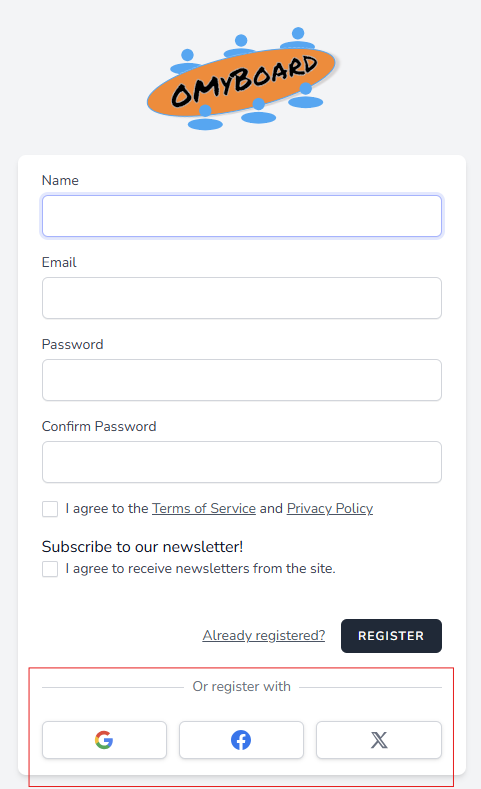
Now you can register using Social Media Authenticators such as Google, Facebook, and X (formerly twitter). Or if you prefer, you can still register using the form authentication.
Social Media
Registering for an OMyBoard account using the Social Media method is as simple as clicking the Social Media authenticator button and following the prompts provided by the authenticator. No need to fill in the above fields. How easy is that!
OMyBoard currently supports Social Media Authenticators Google,
Facebook, and X. If you would like to see others added, let us know
by sending a Feature Suggestion.
If you have previously registered using form authentication and click one of the social media authentication providers that use the same email address, OMyBoard first request confirmation to link the existing OMyBoard account to your social media account.
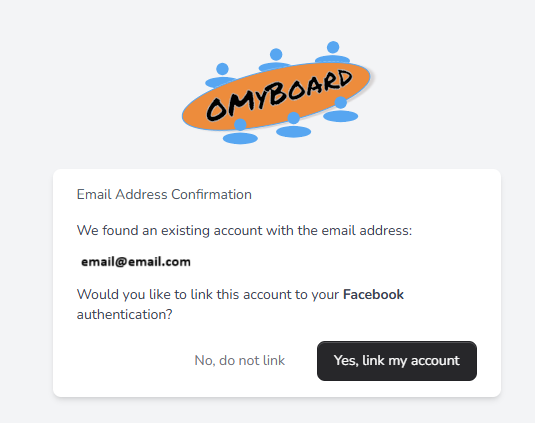
If you choose not to link, nothing will change and you will continue to access your OMyBoard account using form authentication. Choosing to link your account will replace your form authentication with social media account authentication.
Form Authentication
Registering for an OMyBoard account using the form authentication method is a simple two-step process.
Step 1
-
Click on the
Sign Upbutton at the top right corner of the omyboard.com page. -
Fill in your Name, Email address, and Password, and agree to the Terms of Service and the Privacy Policy by clicking the checkbox. Then click the
Registerbutton. -
A confirmation email will be sent to the email address provided. The Registration page will provide a link to resend the confirmation email or log out.
Step 2
-
Go to your email application and look for the Verify Email Address email from OMyBoard <no-reply@mail.omyboard.com (check your spam or junk folder if it is not in your inbox).
- Click the
Verify Email Addressbutton or copy the link provided at the bottom of the email and paste into your web browser.
- Click the
-
After clicking the button in the email, you will be redirected back to your web browser and will be logged into OMyBoard.
Congratulations! You've registered yourself for an OMyBoard account.
{info} Note: The Verification Link in the confirmation email expires after 60 minutes. If this happens, use the
Resend Verification Emailbutton on the Registration page to send a new email and link.
Next step: Create a New Board or Find a Board to join.
© 2026 OMyBoard. All rights reserved.